跳到主要內容

新的iPad Pro渲染描繪角度底盤和類似iPhone的天線線

串行移動洩密者Steve Hemmerstoffer今天分享了高分辨率渲染,由科技博客MySmartPrice提供,這是基於蘋果公司即將推出的重新設計的iPad Pro 洩露的CAD圖像。 

值得信賴的蘋果公司分析師Ming-Chi Kuo表示,蘋果公司正在開發兩款採用iPhone X設計線索的iPad Pro新型號,尺寸分別為11和12.9英寸。 
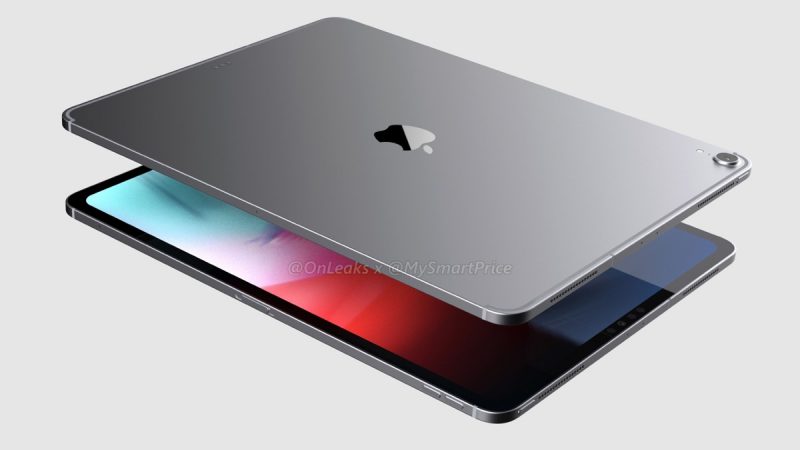

除了更薄的邊框,沒有Home按鈕,以及預期的iPad Pro設計的邊緣到邊緣顯示外,模擬的渲染還描繪了一個帶有角度底盤的設備,它具有iPhone 4風格的倒角邊緣,而不是圓形底盤當代平板電腦。 

在蘋果公司不斷發展的iPhone手機設計中,該設備顯示出沿著機箱頂部和底部邊緣的單獨天線條,而不是現有蜂窩型號兩側的單個連續天線線。 
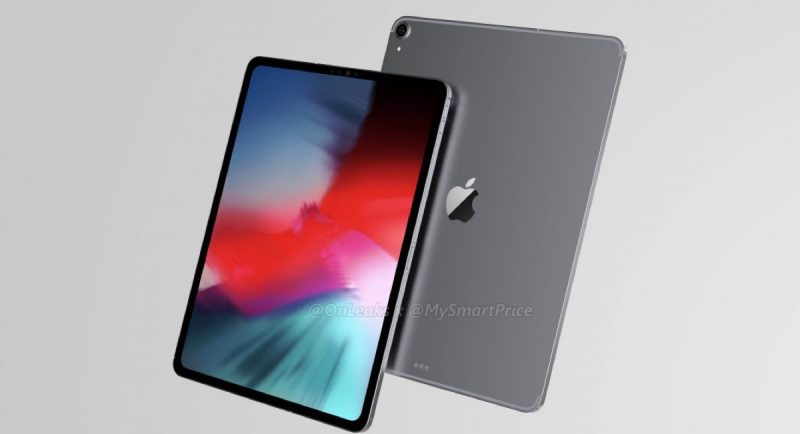

在其他地方,仔細觀察會發現明顯缺少耳機插孔,Lightning端口兩側各有兩排揚聲器通風口 - 類似於上個月洩露的CAD圖像 - 以及位於擋板內的TrueDepth相機上方的兩個麥克風端口。 

與之前的CAD圖像一樣,智能連接器位於Lightning端口正上方的設備背面,而不是當前iPad Pro型號的橫向方向。 
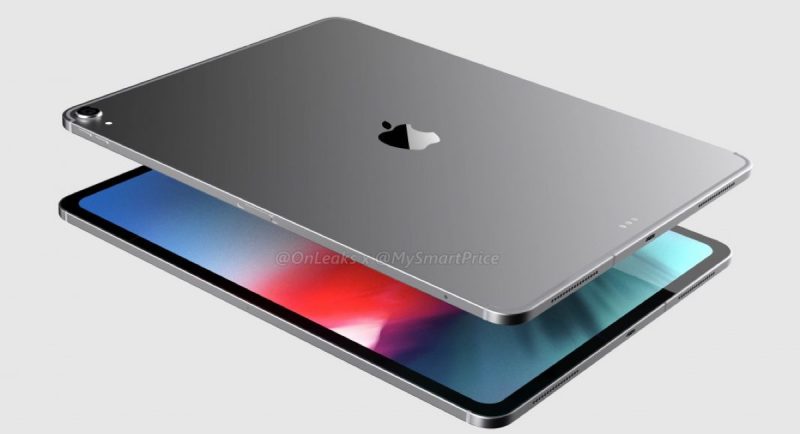

MySmartPrice聲稱該定位與面向身份證的面部識別限制有關,但是聯繫良好的彭博記者馬克古爾曼表示,水平面部識別支持是即將推出的iPad Pro型號的一項功能,預計將於本月公佈。 

渲染中的其他細節的合法性 - 以及據稱基於它們洩露的CAD圖像 - 還有待確認,但蘋果公司9月12日的預定媒體活動中揭開序幕

留言

這個網誌中的熱門文章

第八代『黑蘋果』主機全部安裝教程

HIGH SIERRA GUIDE  For  ASUS  STRIX Z370 -G  ROG ( Micro-ATX ) ** UPDATE   5th Jan 2018  /   Clover v2.4k r4359 ** 硬體配置規格 Asus ROG Strix Z370-G Gaming (Wi-Fi AC) ( Micro ATX )  i7 8700 3.2GHz  Corsair Vengeance LPX 8GB (1 x 8GB) DDR4 DRAM 2400MHz (PC4-19200) C14 Memory Kit - Black  Samsung Evo 960 250GB NVMe SSD  NVIDIA GeForce GTX 1080ti (or a GTX 1050 / 1060 / 1070 will work  ) ABWB 802.11AC WI-FI with Bluetooth 4.0 PCI-Express  BitFenix Phenom – Tower – micro ATX  Noctua NH-L9x65 - NH-L9x65 Low Profile Performance CPU Cooler  EVGA SuperNOVA 750 G3, 80 Plus Gold 750W  Corsair UK K65 Rapidfire Cherry MX Speed Performance Multi-Colour RGB Backlit 10 Keyless  Samsung 850 EVO 500GB  Dell UltraSharp U2717D (2560x1440DP) IPS LED 27-Inch Infinity Edge 成功運行的功能 Wi-Fi ( Onboard WiFi card was replaced, see components list above )   Bluetooth Ethernet ...

黑蘋果安裝教程-在Windows下使用TransMac製作USB安裝碟

背景介紹  蘋果公司電腦以前曾叫做麥金塔電腦(  Macintosh  ),至今為止,蘋果公司仍沿用“Mac”以命名其所設計生產的個人電腦。Apple的macOS僅允許在“Apple品牌”的計算機上使用,因此在其他非蘋果機器上安裝運行的macOS系統被稱為  Hackintosh  ,國內也稱為  黑蘋果  。  安裝過程概覽   使用TransMac製作啟動盤   準備工具  在Windows操作系統下使用  TransMac  軟件來製作黑蘋果啟動USB安裝碟 macOS High Sierra 10.13.6(17G65) Installer with Clover 4596 系統鏡像  點擊下載 TransMac  點擊下載 至少8GB的USB隨身碟 安裝過程  TransMac  使用  管理員身份  打開,因為是正版軟件沒有破解,耐心等待10秒然後點擊  Run  打開軟件。  B站黑蘋果安裝教程 格式化U盤  在軟件的左側找到自己的隨身碟,然後  右鍵  選擇  Formar Disk for Mac  意思是將USB隨身碟格式化為Mac格式,當然隨身碟內容提前做好備份。  B站黑蘋果安裝教程 期間彈出警告是否繼續操作,點擊  Yes  ,格式化的磁盤名稱,默認即可,點擊  OK  :  B站黑蘋果安裝教程 是否繼續操作,點擊  Yes  ,然後開始格式化USB隨身碟,提示  Format Complete  表明格式化完成。  寫入dmg鏡像  然後  右鍵  選擇  Restore with Disk Image  來準備將dmg鏡像寫入到U盤中:  B站黑蘋果安裝教程 是否繼續操作,點擊  Yes  ,選擇自己...

FRESH INSTALLING MACOS HIGH SIERRA ON AMD RYZEN HACKINTOSH GUIDE (10.13)

This guide will show you the steps to install Sierra on a AMD Ryzen PC using a VMWare Virtual Machine. I’m making this guide for those who don’t have access to a Mac and need macOS to either try out for a bit or create a macOS boot loader installer for a AMD hackintosh build. There is another VMWare Sierra guide on this site, but  with AMD system a modified VMWare image is required to even be able to boot macOS so this AMD VMWare guide has to be used instead. WHY NOT A HIGH SIERRA VM? So getting High Sierra running as a virtual machine in Windows or Linux is actually pretty difficult with a Ryzen PC. Some will manage to get it working, butt not for others with there being all sorts of errors that can potentially popup on the screen. I actually spent half a day trying to get High Sierra working on VMWare player and wasn’t able to do it, so I had to resort to using Sierra, which I posted the steps for here. You can still use a Sierra VM to download High Sierra and create a Hig...